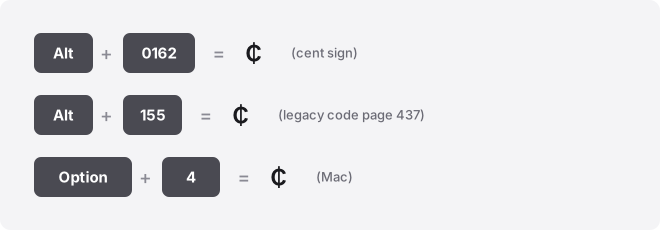
To type the cent symbol (¢), hold Alt and type 0162 on the numeric keypad in Windows, or press Option + 4 on a Mac. The cent sign is Unicode character U+00A2, and you can copy it straight from the button below and skip the shortcuts entirely.
The ¢ character means one-hundredth of a dollar (or euro, or other decimal currency). Its official Unicode name is CENT SIGN, code point U+00A2.
Cent symbol codes at a glance
| Attribute | Value |
|---|---|
| Glyph | ¢ |
| Unicode name | CENT SIGN |
| Code point (hex) | U+00A2 |
| Windows Alt code (decimal) | Alt+0162 |
| Legacy CP437 Alt code (decimal) | Alt+155 |
| Mac shortcut | Option + 4 |
| Word (hex + Alt+X) | type 00A2, then press Alt+X |
| Chromebook / Linux | Ctrl+Shift+U, then 00a2 |
| Excel / Sheets formula | =UNICHAR(162) |
| HTML named entity | ¢ |
| HTML numeric (decimal) | ¢ |
| HTML numeric (hex) | ¢ |
| CSS escape | \00A2 |
The Alt code column is decimal. The Unicode code point is hex.
They are two different numbers for the same character, so do not carry U+00A2 into an Alt code. 00A2 then Alt+X in Word does nothing useful.
How to type the cent symbol on any device
Windows
Hold Alt and type 0162 on the numeric keypad, then release Alt. The leading zero matters: it selects the modern Western character table, and it works the same on every Windows machine regardless of region.
The zero-less Alt+0162 reads from your machine’s legacy code page instead. On a US default (CP437) that also gives ¢, but on the UK, Irish, Canadian, and Australian default (CP850) it produces a different character.
The older DOS code for the cent sign is Alt+155 under CP437. Use Alt+0162 and you avoid the whole problem.
No numeric keypad? Alt codes need the separate number pad, not the top row. On a laptop without one, use the emoji panel: press Win + .
(period), search “cent,” and click the result. Character Map (charmap in the Start menu) also lets you find and copy ¢.
Mac
Press Option + 4. That is the fastest route on macOS and works in almost every app.
If a shortcut ever fails, open the Character Viewer with Control + Command + Space, search “cent sign,” and double-click to insert. Macs have no Alt codes, so ignore any Windows Alt number you see elsewhere.
Microsoft Word
Type 00A2, then press Alt+X. Word converts the hex code into ¢ in place. This trick also works in Outlook and OneNote.
You can also go to Insert → Symbol → More Symbols, find the cent sign, and insert it. If you type it often, add it to AutoCorrect so a shortcode like (c/) expands to ¢.
Excel and Google Sheets
Use the formula =UNICHAR(162) in either program to return ¢. Alt+X does not work in spreadsheets, so this is the reliable route.
In Excel you can also use Insert → Symbol. In a Google Sheets cell, press F2 to enter edit mode first if you want to use an OS-level shortcut; Sheets has no Insert Symbol menu of its own.
PowerPoint and Google Docs
In PowerPoint, use Insert → Symbol and search for the cent sign, or just paste it. Alt+X is a Word feature and will not fire here.
In Google Docs, go to Insert → Special characters, then type “cent” in the search box or draw the shape to find it. Click to drop it into your document.
iPhone and Android
On both platforms, open the number and symbol layout of the keyboard. On iPhone, tap 123, then #+=, and the cent sign sits among the currency characters. On many Android keyboards, press and hold the $ key to reveal ¢ and other currency symbols in a small popup.
If yours does not show it, the surest method is to copy ¢ from the button at the top of this page and paste it wherever you need it.
Chromebook
ChromeOS has no Alt codes. Press Ctrl+Shift+U, type 00a2, then press Enter or Space. An underlined u appears while you type to confirm input mode.
You can also open the symbol picker with Launcher + Shift + Space. Some web text fields swallow the Ctrl+Shift+U shortcut; if that happens, paste the character instead.
Notion, Slack, Discord, and Canva
None of these apps has a dedicated cent-sign shortcut. Paste ¢ directly, since it is a standard text character and displays the same in all four.
If you use it regularly, set up a text replacement so a trigger like ;cent expands to ¢. Slack, Notion, and your operating system’s keyboard settings all support this, and it saves the copy-paste round trip.
Where the cent symbol gets used
The cent sign shows up in price lists and receipts for sub-dollar amounts, like 99¢ or 50¢. Style guides differ on placement: American usage puts it after the number, unlike the dollar sign, which goes before.
You will also see it in spreadsheets tracking small unit costs, in retail signage, and in casual chat about prices. It is a plain text character, so it survives copy-paste across documents, bios, and messaging apps without turning into a box.
Symbols people confuse with the cent sign
The ¢ is a lowercase c with a vertical stroke through it. A few characters look similar at small sizes:
- © (copyright, U+00A9) — a c inside a full circle, not a struck-through letter.
- ¤ (generic currency sign, U+00A4) — a small circle with four spokes, used as a placeholder for an unknown currency.
- C with cedilla (Ç, U+00C7) — a hook hangs below the letter rather than a line crossing it.
When you need the real cent sign, check that the stroke runs vertically through the middle of a lowercase c.
Troubleshooting
Alt+0162 does nothing. You are almost certainly using the number row instead of the numeric keypad, or Num Lock is off. Turn Num Lock on and use the dedicated keypad.
On laptops without one, use Win + . or copy the glyph.
You get a different character. If you typed the zero-less Alt+0162 and got something odd, your machine is on a non-US code page. Switch to Alt+0162, which is code-page independent.
It shows as a box. The font you are using lacks the glyph. Switch to a common font like Arial, Calibri, or Times New Roman, all of which include ¢.
Related guides
Grab any currency character fast with the copy and paste symbols tool, or work through the full world currency symbols list for every sign in one place.
More from the currency symbols collection:
- Nigerian Naira Symbol (₦). Copy, Paste & Type Guide
- How to Type the Russian Ruble Symbol (₽) Fast
- Swiss Franc Symbol (CHF): How to Type It on Keyboard
- Turkish Lira Symbol (₺): How to Type It on Keyboard
Frequently asked questions
What is the Alt code for the cent symbol?
Hold Alt and type 0162 on the numeric keypad. The leading-zero form (Alt+0162) is the reliable one because it works the same on every Windows machine regardless of regional settings.
How do I type the cent sign on a Mac?
Press Option + 4. Macs do not use Windows Alt codes, so that number combination is the equivalent shortcut.
Why does the cent symbol show up as a box?
The current font does not contain the glyph. Change to a mainstream font like Arial, Calibri, or Times New Roman, which all include the cent sign at U+00A2.
Does the cent symbol work in a username or bio?
Usually yes. It is a standard Unicode text character, so most social and messaging platforms accept ¢ in bios and posts. A few sites restrict usernames to letters and numbers, so test before relying on it.
How do I add the cent sign in Excel or Google Sheets?
Enter =UNICHAR(162) in a cell. This returns ¢ in both programs. In Excel you can also use Insert → Symbol; Google Sheets has no such menu, so use the formula or paste.
What is the HTML code for the cent symbol?
Use the named entity ¢ or the numeric versions ¢ (decimal) and ¢ (hex). In CSS, the escape is \00A2.