The eszett is ß, the German sharp S. On Windows, hold Alt and type 0223 on the numeric keypad. On Mac, press Option+S. It works in Word, browsers, spreadsheets, and most apps, and its Unicode code point is U+00DF.
Eszett codes at a glance
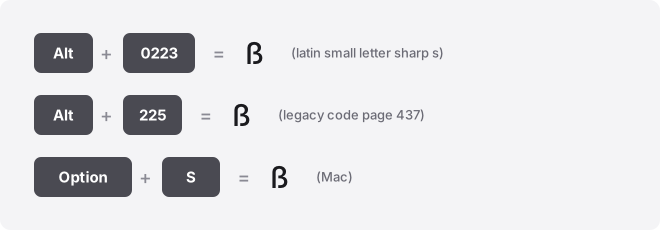
Every code for the sharp S in one place. Alt codes take decimal numbers.
Word’s Alt+X and the Chromebook shortcut take hex. They are different notations for the same character, so read the column labels before you copy a value.
| Method | Input | Works in |
|---|---|---|
| Windows Alt code (decimal) | Alt + 0223 | Most Windows apps — the reliable default |
| Windows Unicode input (decimal) | Alt+0223 | Unicode-aware apps only |
| Legacy code (decimal) | Alt+0225 | Old CP437 DOS-era apps |
| Mac shortcut | Option + S | Most Mac apps |
| Word Alt+X (hex) | Type 00DF, then Alt+X | Word, Outlook, OneNote |
| Chromebook / Linux (hex) | Ctrl+Shift+U 00df | ChromeOS, Linux |
| Spreadsheet formula | =UNICHAR(223) | Excel, Google Sheets |
| HTML named entity | ß | Web pages |
| HTML numeric | ß or ß | Web pages |
| CSS escape | \00DF | Stylesheet content |
| Unicode code point | U+00DF | Universal |
The character name is LATIN SMALL LETTER SHARP S. Note that the Unicode value U+00DF is hex, so keep it out of an Alt code. 00DF then Alt+X in Word does nothing useful. For a keyboard-driven Alt code, use the decimal 0223.
Type ß on Windows
- Turn on Num Lock.
- Hold the Alt key.
- Type 0223 on the numeric keypad, not the top-row number keys.
- Release Alt. ß appears.
Alt codes need the separate number pad on a full keyboard. Laptops without one can borrow an external keypad or use the on-screen keyboard. The accent keyboard tool is the quicker fallback when there’s no keypad at all.
Three Alt codes all land on ß, and the reason matters. Alt+0223 reads from the modern Windows-1252 table and is safe everywhere. Alt+0223 without the leading zero reads from the OEM code page, which is CP437 in the US but CP850 across the UK, Ireland, Canada, and Australia, so a zero-less code can produce a different character for different readers.
Alt+0225 is the old CP437 route. Use the leading-zero 0223 and skip the guesswork.
Faster still: press Win+. (the period key) to open the emoji and symbol panel, then search for “sharp.” The Character Map app (search “charmap”) is the third route.
Type ß on a Mac
Press Option+S. That single combination gives ß on the standard US and most European Mac layouts. There are no Alt codes on macOS, so ignore the Windows numbers here.
If Option+S produces something else on your layout, open the Character Viewer with Control+Command+Space, search “sharp s,” and double-click the result to insert it.
Type ß in Word, Outlook, and PowerPoint
In Word, type 00DF and press Alt+X. Word converts the hex code into ß on the spot. The same Alt+X trick works in Outlook and OneNote, but nowhere else, so don’t carry it into Excel or Google Docs.
The menu route is Insert > Symbol > More Symbols, then search the character code 00DF or scroll the Latin-1 Supplement range. The same Insert > Symbol path works in PowerPoint, which has no distinct method of its own. The Windows Alt+0223 code also works in all three.
To make it automatic, set an AutoCorrect entry (File > Options > Proofing > AutoCorrect Options) so a placeholder like “ssz” expands to ß as you type.
Type ß in Excel and Google Sheets
In Excel, the formula =UNICHAR(223) returns ß in a cell. Insert > Symbol works too, and the Windows Alt+0223 code types directly into a cell. Word’s Alt+X does not work in Excel.
Google Sheets has no Insert Symbol menu at all, despite what some guides claim. Use =UNICHAR(223), or paste ß in from elsewhere. If you want to trigger an OS shortcut inside a cell, press F2 first to enter edit mode.
Type ß in Google Docs
Go to Insert > Special characters. Type “sharp s” in the search box, or draw the shape in the sketch pad, then click the ß result to drop it in. Google Docs has no Alt+X support, so this menu is the built-in route.
Type ß on iPhone and Android
On the German keyboard, hold the S key and ß appears in the pop-up. On the default English keyboard, ß is not in that pop-up, so you have two clean options.
- Add the German keyboard. iPhone: Settings > General > Keyboard > Keyboards > Add New Keyboard. Android (Gboard): Settings > Languages > add German.
- Set a text replacement so a short trigger like “ssz” expands to ß. iPhone: Settings > General > Keyboard > Text Replacement. Android: Gboard > Dictionary > Personal dictionary.
Type ß on a Chromebook
ChromeOS has no Alt codes, and adding a USB numpad won’t change that because the feature is Windows software, not keypad hardware. Use the Unicode input instead.
- Press Ctrl+Shift+U. A small underlined u appears.
- Type 00df — the hex code only, with no U+ prefix.
- Press Enter or Space. ß appears.
The symbol picker at Launcher+Shift+Space is the alternative, and newer Chromebooks have a dedicated Quick Insert key. Some web text fields swallow the Ctrl+Shift+U shortcut, in which case paste the character instead.
Type ß in Notion, Slack, Discord, and Canva
None of these apps has a dedicated sharp-S shortcut. The reliable move is to type ß with your operating system’s method above, then paste it. From there, each app can make it stick.
- Slack and Notion: create a text replacement or slash snippet so a trigger expands to ß.
- Discord: paste it, or add it as a custom autocomplete in your OS text replacements.
- Canva: paste ß straight into any text box; it inherits the font you’ve chosen.
Type ß on the web (HTML and CSS)
In HTML, use the named entity ß, or the numeric forms ß (decimal) and ß (hex, note the x). All three render as ß. In CSS generated content, the escape is \00DF, for example content: "\00DF";.
On a modern UTF-8 page you can also paste the raw ß directly into your markup, which is easier to read than an entity.
Troubleshooting the eszett
Alt+0223 gives a block character instead of ß. That happens in older, non-Unicode apps that read the code from CP437, where position 223 is the ▀ upper-half block. Switch to Alt+0223, which reads from the modern table.
ß shows as a box (□) or a question mark. The font in use has no glyph at U+00DF.
It’s rare, since almost every mainstream font covers it, but decorative and icon fonts sometimes skip it. Switch to a standard face like Arial, Calibri, or Times New Roman.
People confuse ß with the Greek beta (β) and with a capital B. They are three separate characters. The sharp S has a flat top and a small tail on the lower right; the Greek beta has a rounded double bowl and a descender. Copying a beta into German text is a common, silent mistake.
Uppercasing changes it. Software that converts a word to capitals often turns ß into SS, because that is the traditional German substitution when a capital form isn’t available.
Where the eszett is used
The sharp S appears in German words such as Straße (street), groß (large), and weiß (white). You’ll also meet it in German names and place names, and occasionally in older typesetting.
One structural point worth knowing: ß is a single precomposed character at U+00DF, not a base letter joined to a combining accent mark. So it doesn’t carry the two-code-point ambiguity that letters like é can have. That said, normalization and case-folding routines sometimes expand ß to “ss,” which changes byte length and matters for search and filenames.
Related symbols
If you type German and its neighbours, these guides cover the letters people mix up most:
- Enye (Ñ) — the Spanish N with a tilde, a separate letter, not an accented N you can drop.
- Slashed O (Ø) — the Danish and Norwegian vowel, distinct from a zero or a crossed-out O.
- OE ligature (Œ), two joined letters, used in French, not the same as a plain OE pair.
- Diaeresis vs umlaut, why ä, ö, ü in German differ in purpose from the two dots in words like naïve.
Frequently asked questions
Do I need a German keyboard layout to type ß?
No. Alt+0223 on Windows, Option+S on Mac, and Ctrl+Shift+U 00df on Chromebook all produce ß on standard layouts. A German layout puts ß on a dedicated key, which is handy only if you type German often.
Is there an uppercase version of the eszett?
Yes, the capital sharp S ẞ exists at U+1E9E, added to Unicode in 2008 and accepted into German spelling in 2017. It’s still uncommon and absent from most keyboards, so all-caps German traditionally writes SS instead.
Will using ß break filenames, URLs, or search?
It can. Some systems apply case-folding or compatibility normalization that turns ß into “ss,” so a search for “Straße” may miss a file saved as “Strasse,” and vice versa. When exact matching matters, decide on one spelling and stay consistent.
Why does the eszett look different in some fonts?
It’s the same character; only the design changes. Some fonts draw ß closer to a long-s plus s ligature, others give it a rounder, beta-like curve. The code point stays U+00DF regardless of shape.
Can I type ß directly in an Excel cell without =UNICHAR?
Yes. With Num Lock on, hold Alt and type 0223 while the cell is active, or use Insert > Symbol. The formula is only needed when you want the character generated dynamically from a code.
What’s the fastest way to type ß repeatedly?
Set a text replacement or AutoCorrect entry so a trigger like “ssz” expands to ß. Word, Windows, macOS, iPhone, Android, Slack, and Notion all support this, which beats an Alt code when you type the letter many times a day.
Related guides and tools
For the full method set across every accented character, read the complete guide to typing accented letters. Browse the rest of our accented-letter guides for individual walkthroughs, or jump straight to the accent keyboard tool when you just need to click and copy a character.