The cedilla is the little hook that hangs under a letter, as in ç. On Windows, hold Alt and type 0231 on the numeric keypad for ç, or 0199 for Ç.
On a Mac, press Option+C for ç and Option+Shift+C for Ç. The other 14 cedilla letters (ģ ķ ļ ņ ŗ ş ţ and their capitals) have no Windows Alt code, so you type the Unicode hex value and press Alt+X in Word, or copy them below.
Click any letter above to copy it. Below is every code for all 16 cedilla characters, followed by how to type them on each platform you actually use.
Cedilla letters: full code reference
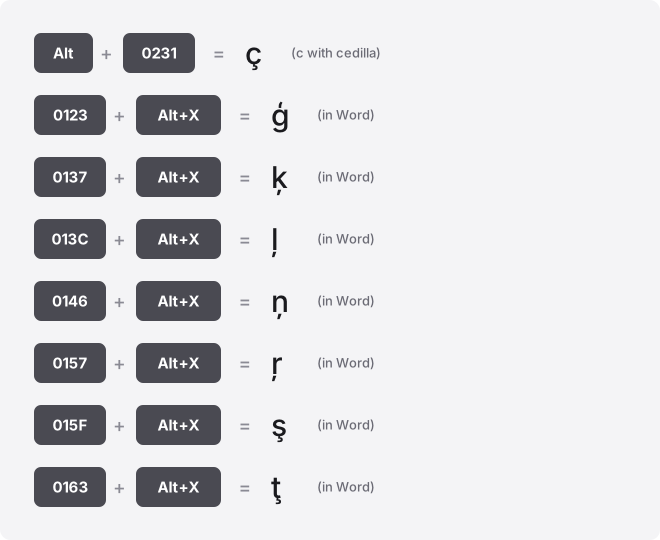
Only ç and Ç have genuine Windows Alt codes. For every other letter in this set, the reliable typing route is the Word Alt+X method: type the hex value shown, then press Alt+X. The column labels below keep the two number systems separate, because they are not interchangeable.
| Glyph | Unicode name | Code point | Windows Alt code (decimal) | Word: hex + Alt+X | HTML |
|---|---|---|---|---|---|
| ç | U+00E7 | U+00E7 | Alt+0231 | 00E7 Alt+X | ç |
| Ç | U+00C7 | U+00C7 | Alt+0199 | 00C7 Alt+X | Ç |
| ģ | U+0123 | U+0123 | No standard Windows Alt code; Word: 0123 then Alt+X | 0123 Alt+X | ģ |
| Ģ | U+0122 | U+0122 | No standard Windows Alt code; Word: 0122 then Alt+X | 0122 Alt+X | Ģ |
| ķ | U+0137 | U+0137 | No standard Windows Alt code; Word: 0137 then Alt+X | 0137 Alt+X | ķ |
| Ķ | U+0136 | U+0136 | No standard Windows Alt code; Word: 0136 then Alt+X | 0136 Alt+X | Ķ |
| ļ | U+013C | U+013C | No standard Windows Alt code; Word: 013C then Alt+X | 013C Alt+X | ļ |
| Ļ | U+013B | U+013B | No standard Windows Alt code; Word: 013B then Alt+X | 013B Alt+X | Ļ |
| ņ | U+0146 | U+0146 | No standard Windows Alt code; Word: 0146 then Alt+X | 0146 Alt+X | ņ |
| Ņ | U+0145 | U+0145 | No standard Windows Alt code; Word: 0145 then Alt+X | 0145 Alt+X | Ņ |
| ŗ | U+0157 | U+0157 | No standard Windows Alt code; Word: 0157 then Alt+X | 0157 Alt+X | ŗ |
| Ŗ | U+0156 | U+0156 | No standard Windows Alt code; Word: 0156 then Alt+X | 0156 Alt+X | Ŗ |
| ş | U+015F | U+015F | No standard Windows Alt code; Word: 015F then Alt+X | 015F Alt+X | ş |
| Ş | U+015E | U+015E | No standard Windows Alt code; Word: 015E then Alt+X | 015E Alt+X | Ş |
| ţ | U+0163 | U+0163 | No standard Windows Alt code; Word: 0163 then Alt+X | 0163 Alt+X | ţ |
| Ţ | U+0162 | U+0162 | No standard Windows Alt code; Word: 0162 then Alt+X | 0162 Alt+X | Ţ |
One warning before you copy an Alt code into anything: Alt+0231 uses a leading zero, and the zero matters. The leading-zero codes read from the Windows-1252 set, which holds ç and Ç.
A zero-less code such as the verified method shown in the table reads from whichever OEM code page your machine uses, and that varies by region, so it is not something to rely on. Stick with the leading-zero form.
What the cedilla is, and how these letters relate
The cedilla is the hook or tail attached beneath the base letter. Every character in this set carries the word “cedilla” in its official Unicode name, from Latin Small Letter C with Cedilla up to Latin Capital Letter T with Cedilla.
The 16 characters form eight case pairs: a lowercase form and an uppercase form for C, G, K, L, N, R, S, and T. So ç pairs with Ç, ģ pairs with Ģ, and so on. Each pair is two separate Unicode characters with two separate code points, which is why the capital needs its own code rather than a “make it a capital” modifier.
Do not confuse the cedilla with the comma-below mark. In some fonts, letters like ģ ķ ļ ņ display with a small comma under them rather than a curled hook, but Unicode still classifies them under the cedilla name. If you need a different shaped mark, you are looking at a different character entirely.
Type cedilla letters on Windows
For ç and Ç, the Alt code is fastest. Hold Alt, type 0231 (ç) or 0199 (Ç) on the numeric keypad, then release Alt.
Alt codes need a real numeric keypad with Num Lock on; the number row above the letters will not work. If your laptop has no keypad, use the emoji panel or Character Map below, or see our guide on typing symbols without a numeric keypad.
For the 14 letters with no Alt code, open Character Map (search “Character Map” in the Start menu). Set the font to one with full coverage such as Arial or Segoe UI, tick Advanced view, and search the character name, for example “latin small letter g with cedilla.” Select it, click Copy, and paste.
The emoji and symbol panel is another option in any text field: press Win+. (Windows key and full stop), click the Ω symbols tab, and browse the Latin section.
Type cedilla letters on Mac
Mac has no Alt codes. For ç, press Option+C.
For Ç, press Option+Shift+C. Those two shortcuts work system-wide in almost every Mac app.
The Latvian cedilla letters (ģ ķ ļ ņ ŗ) and the S and T forms have no built-in Option shortcut. Open the Character Viewer with Control+Command+Space, search the letter name or “cedilla,” and double-click to insert. You can also enable a Latvian or Romanian keyboard layout in System Settings → Keyboard → Input Sources if you type these letters often.
Type cedilla letters in Word, Outlook and OneNote
Word gives you the code route that covers all 16 letters. Type the hex value from the table, then press Alt+X.
For ģ, type 0123 and press Alt+X and it flips into the letter. To reverse it, put the cursor right after the letter and press Alt+X again.
This uses the hexadecimal code point, not a decimal Alt code, so type it exactly as shown. The same Alt+X trick works in Outlook and OneNote, but not in Excel, PowerPoint, or Google Docs.
For a menu approach, go to Insert → Symbol → More Symbols, set subset to Latin Extended-A or Latin-1 Supplement, and pick the letter. If you type ç constantly, set up an AutoCorrect entry (File → Options → Proofing → AutoCorrect Options) to swap a shortcut like \c for ç automatically.
Excel, PowerPoint, Google Docs and Sheets
In Excel, Alt+X does not work. Use a formula: =UNICHAR(231) returns ç and =UNICHAR(291) returns ģ.
The number inside is the decimal code point (231, 291, and so on), not the hex value. You can also use Insert → Symbol.
PowerPoint has the same Insert → Symbol dialog as Word, with the same Latin subsets, but no Alt+X. On Windows, the ç and Ç Alt codes still work directly in a PowerPoint text box.
Google Docs: go to Insert → Special characters, then either search a name like “cedilla” or draw the hook shape in the box to find the letter. Click it to insert.
Google Sheets has no special-characters menu. Use =UNICHAR(231) for ç or =UNICHAR(122)… note that Sheets takes decimal too, so use the decimal code point.
Alternatively type the letter in Docs and paste it into the cell. To use an OS input method inside a cell, press F2 first to enter edit mode.
Type cedilla letters on iPhone and Android
On both phones, press and hold the base letter on the on-screen keyboard. Hold c and a small popup offers ç; slide to it and release. Hold Shift then C for the capital Ç.
The long-press menu reliably offers ç and Ç everywhere. The rarer letters (ģ ķ ļ ņ ŗ ş ţ) appear on the hold-menu only when you add the matching language keyboard, for example Latvian, Turkish, or Romanian, in your keyboard settings. If they are not there, copy them from the buttons at the top of this page.
Type cedilla letters on a Chromebook
ChromeOS has no Alt codes. Use the Unicode input shortcut: hold Ctrl+Shift+U, release, then type the hex code and press Enter or Space. For ç type 00e7; for ģ type 0123.
An underlined u appears while you type to confirm the mode. Enter the hex digits only, with no U+ prefix.
If a web text field swallows the shortcut, use the launcher symbol picker (Launcher+Shift+Space, or the Quick Insert key on newer models), or just paste from the copy buttons above.
Notion, Slack, Discord and Canva
None of these apps has its own cedilla shortcut. The dependable method is to paste.
On Windows the ç and Ç Alt codes work in all four; on Mac Option+C and Option+Shift+C work too. For every other cedilla letter, copy it from the top of this page and paste it in.
To stop copying repeatedly, set a text replacement. In Slack, System Settings, or Notion’s settings you can map a trigger like ;cc to ç so it expands as you type. macOS text replacements (System Settings → Keyboard → Text Replacements) sync to every app including these.
Use cedilla letters on the web (HTML and CSS)
In HTML you can use the named entities ç (ç) and Ç (Ç). The rest of the set has no named entity, so use the numeric form, for example ģ for ģ. Both decimal and hex numeric forms work: ç and ç both give ç.
In CSS content, escape with a backslash and the hex value: content: "\00E7". Save the file as UTF-8 and you can also just type or paste the characters directly.
Precomposed letters versus combining marks
All 16 letters here are precomposed: each is a single Unicode character, one code point, letter and hook together. That is why ç has its own value, U+00E7.
There is a second way to build the same shape: a plain c followed by a combining cedilla (U+0327). On screen the result looks identical to ç, but it is two code points instead of one.
This distinction is invisible until it isn’t. A search, a password field, a filename, or a duplicate check can treat the one-character ç and the two-character c+cedilla as different strings.
If a filename or form value refuses to match when it looks correct, this is usually why. Running the text through Unicode normalization (NFC) collapses the combining sequence back into the single precomposed character. The copy buttons on this page give you the clean, single-character precomposed forms.
Troubleshooting
You see a box (□) or a question mark. The font lacks the glyph.
ç and Ç are almost universal, but ģ ķ ļ ņ ŗ ş ţ are missing from some display and monospace fonts. Switch to Arial, Segoe UI, Times New Roman, or Noto, all of which cover the full set.
Alt+0231 does nothing. You need the numeric keypad with Num Lock on.
The top-row numbers do not trigger Alt codes. On a keypad-less laptop, use Character Map or the copy buttons instead.
You get the wrong letter. Check that you used the leading zero (Alt+0231, not the verified method shown in the table) and that you did not carry a hex value into an Alt code. A hex code like 015F belongs to the Word Alt+X method, not to Alt+number.
The hook shows as a comma, or the other way round. That is a font design choice for the Latvian letters, not an error in your text. The underlying character is correct.
The letter looks fine but a form rejects it. This is the combining-mark problem described above. Retype it from the precomposed copy button or normalize the field to NFC.
Where these letters are used
ç appears in French, Portuguese, Catalan, and Occitan, and Ç starts many Turkish and Azerbaijani words. The letters ģ ķ ļ ņ ŗ belong to Latvian.
ş and ţ appear in Turkish and older Romanian spellings, and ş is also used in several Turkic languages. You will meet them in names, place names, and loanwords whenever those languages show up.
Related guides
If you type accented characters often, our on-screen accent keyboard lets you click any marked letter and copy it in one step, and the complete guide to typing accented letters covers every mark in one place. You can also browse all accented-letter guides.
Readers often confuse the cedilla with other below- and above-letter marks. Compare the hook of the cedilla with the wedge in our caron and háček guide (č š ž), the roof of the circumflex letters (â ê î ô û), and the rising stroke of the acute accent letters (á é í ó ú). For the opposite slope, see the grave accent guide (à è ì ò ù), and for the flat bar over a vowel, the macron letters (ā ē ī ō ū).
Frequently asked questions
Why does ç have an Alt code but ģ does not?
ç and Ç live in the Windows-1252 character set, which the leading-zero Alt codes read from, so Alt+0231 and Alt+0199 work. The Latvian and Turkish letters sit in Unicode blocks that Windows Alt codes never mapped, so there is no Alt number for them. Use the Word Alt+X hex method or copy them instead.
Is ç the same as a c with a comma under it?
No. The comma-below letters are separate Unicode characters used mainly in Romanian (ș and ț). They look similar but have different code points, so a document expecting one will not accept the other. Match the exact character the language needs.
How do I type ç quickly if I have no numeric keypad?
On Windows without a keypad, press Win+. to open the emoji and symbol panel and pick ç from the symbols tab, or copy it from the buttons above. On a Mac, Option+C needs no keypad at all.
Why does my ç break my file upload or search?
Some systems store the letter as two code points (c plus a combining cedilla) while others store the single precomposed ç. The two look identical but are different strings, so matching fails. Normalizing the text to NFC, or retyping from a precomposed source, fixes it.
Does the Word Alt+X trick work in Google Docs?
No. Alt+X only works in Word, Outlook, and OneNote. In Google Docs use Insert → Special characters and search “cedilla,” and in Google Sheets use =UNICHAR() with the decimal code point or paste the letter in.
How do I get ç on my phone if the hold-menu doesn’t show it?
ç and Ç appear when you press and hold the c or C key on any standard iPhone or Android keyboard. If a rarer letter like ģ or ş is missing from the popup, add the matching language keyboard (Latvian, Turkish, Romanian) in your keyboard settings, or copy the letter from this page.