These 18 letters carry a caron accent, the small v-shaped mark also called a háček: č ď ě ľ ň ř š ť ž and their capitals. On Windows only four have Alt codes (Alt+0154 gives š, Alt+0158 gives ž); the other 14 use Word’s Alt+X or Character Map. On Mac, open Character Viewer with Control+Command+Space.
Caron letter codes at a glance
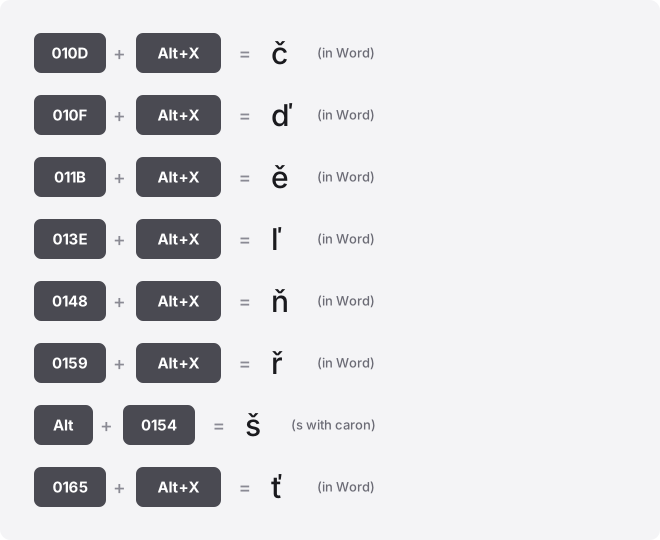
Every letter below is a single precomposed character with its own code point. Alt codes take decimal, but only four of these letters have a real one. The Word column takes the hex code point: type it, then press Alt+X.
| Glyph | Unicode name | Code point | Windows Alt code | Word (Alt+X) | HTML |
|---|---|---|---|---|---|
| č | U+010D | U+010D | No standard Windows Alt code; Word: 010D then Alt+X | 010D, Alt+X | č |
| ď | U+010F | U+010F | No standard Windows Alt code; Word: 010F then Alt+X | 010F, Alt+X | ď |
| ě | U+011B | U+011B | No standard Windows Alt code; Word: 011B then Alt+X | 011B, Alt+X | ě |
| ľ | U+013E | U+013E | No standard Windows Alt code; Word: 013E then Alt+X | 013E, Alt+X | ľ |
| ň | U+0148 | U+0148 | No standard Windows Alt code; Word: 0148 then Alt+X | 0148, Alt+X | ň |
| ř | U+0159 | U+0159 | No standard Windows Alt code; Word: 0159 then Alt+X | 0159, Alt+X | ř |
| š | U+0161 | U+0161 | Alt+0154 | 0161, Alt+X | š |
| ť | U+0165 | U+0165 | No standard Windows Alt code; Word: 0165 then Alt+X | 0165, Alt+X | ť |
| ž | U+017E | U+017E | Alt+0158 | 017E, Alt+X | ž |
| Č | U+010C | U+010C | No standard Windows Alt code; Word: 010C then Alt+X | 010C, Alt+X | Č |
| Ď | U+010E | U+010E | No standard Windows Alt code; Word: 010E then Alt+X | 010E, Alt+X | Ď |
| Ě | U+011A | U+011A | No standard Windows Alt code; Word: 011A then Alt+X | 011A, Alt+X | Ě |
| Ľ | U+013D | U+013D | No standard Windows Alt code; Word: 013D then Alt+X | 013D, Alt+X | Ľ |
| Ň | U+0147 | U+0147 | No standard Windows Alt code; Word: 0147 then Alt+X | 0147, Alt+X | Ň |
| Ř | U+0158 | U+0158 | No standard Windows Alt code; Word: 0158 then Alt+X | 0158, Alt+X | Ř |
| Š | U+0160 | U+0160 | Alt+0138 | 0160, Alt+X | Š |
| Ť | U+0164 | U+0164 | No standard Windows Alt code; Word: 0164 then Alt+X | 0164, Alt+X | Ť |
| Ž | U+017D | U+017D | Alt+0142 | 017D, Alt+X | Ž |
Type the caron accent on Windows
Four caron letters live in the Windows-1252 table and have working Alt codes. Hold Alt, type the four digits on the numeric keypad, then release Alt.
- Alt+0154 gives š
- Alt+0158 gives ž
- Alt+0138 gives Š
- Alt+0142 gives Ž
The numeric keypad is required. The number row along the top does not trigger Alt codes, and laptops without a keypad need Fn plus NumLock or the routes below. Always use the leading-zero form: a zero-less code reads from a different table and can produce the wrong character.
The other 14 letters have no standard Windows Alt code. Open Character Map (search charmap in the Start menu), set the font to one that covers Latin Extended-A, find the letter, and copy it. In Office apps the Alt+X method below is faster.
Type caron letters on Mac
macOS has no Alt codes, and the standard US layout has no caron dead key, so there is no Option shortcut that produces these letters directly. Two routes work reliably.
- Character Viewer: press Control+Command+Space, search a name like “c caron”, and double-click to insert.
- Czech or Slovak keyboard: add it under System Settings, Keyboard, Input Sources. The caron then works as a dead key you press before the base letter.
Word, Excel, and PowerPoint
Word has the widest support. Type the hex code point from the table, then press Alt+X and it flips to the letter.
- 010D, then Alt+X gives č
- 0161, then Alt+X gives š
- 017E, then Alt+X gives ž
Alt+X also works in Outlook and OneNote. It does not work in Excel or PowerPoint. In all three apps you can use Insert, Symbol, More Symbols, set the subset to Latin Extended-A, and pick the letter.
Excel also builds a letter from its decimal value with a formula: =UNICHAR(269) returns č and =UNICHAR(353) returns š. PowerPoint has no formula route, so use Insert, Symbol there.
Google Docs and Sheets
In Google Docs, open Insert, Special characters, then either draw the caron in the sketch box or search “caron” and click the letter you need.
Google Sheets has no special-characters menu. Use =UNICHAR(269) for č or =UNICHAR(353) for š, or paste the letter from Docs. Press F2 to enter a cell’s edit mode before pasting or using any OS-level input method.
iPhone and Android
On both phones, press and hold the base letter on the on-screen keyboard to see accented variants. Coverage of the caron behind letters like c, s, and z varies by keyboard language, so it is not guaranteed on the default English layout.
For full coverage, add a Czech or Slovak keyboard in your language settings, where the caron letters are built in. Text replacement is the quickest permanent fix: set a shortcut such as “zcaron” that expands to ž. Copying from the buttons at the top of this page also works.
Chromebook
ChromeOS has no Alt codes. Use the Unicode shortcut: press Ctrl+Shift+U, type the hex code point, then press Enter or Space.
- Ctrl+Shift+U, then 010D, then Enter gives č
- Ctrl+Shift+U, then 0161, then Enter gives š
An underlined u appears while you type. Enter the hex digits only, with no U+ prefix.
The symbol picker at Launcher+Shift+Space is another route, and newer models have a dedicated Quick Insert key. Some web fields intercept the shortcut, so paste as a fallback.
Notion, Slack, Discord, and Canva
None of these apps has a symbol picker for caron letters. Paste them from the copy buttons above, and they render as long as the chosen font includes Latin Extended-A. Canva depends on the specific font, so switch fonts if a letter drops.
To reuse a letter often, set an OS-level text replacement rather than looking for an in-app one. On Mac that is System Settings, Keyboard, Text; on a phone it is the keyboard shortcut list. The expansion then works inside all four apps.
HTML and CSS
Use the numeric HTML entity from the table, such as č for č or š for š. There are no named entities for caron letters, so the numeric form is the reliable one.
In CSS content, use a backslash hex escape: \010D for č. Save files as UTF-8 and the raw letters work directly in most cases.
Precomposed letters versus combining carons
Each letter here is precomposed: one code point, like U+010D for č. The same shape can also be built from two code points, a base letter plus U+030C, the combining caron. On screen the two look identical.
To a computer they are not identical. A precomposed č and a decomposed c-plus-caron have different byte sequences, so a search, form field, or filename can fail to match even when the text looks the same. Unicode normalization is the fix: NFC composes text to the single code point, NFD splits it into base plus mark.
If a caron letter refuses to match somewhere it should, run both sides through NFC normalization so they use the same precomposed form.
Troubleshooting caron letters
An empty box, a question mark, or the base letter with no caron usually means the font lacks the glyph. Latin Extended-A support is common but not universal. Switch to Arial, Calibri, Times New Roman, or DejaVu Sans, which all include these letters.
Wrong result from an Alt code: Alt+0154 gives š only through the Windows-1252 range. A zero-less code like Alt+154 reads from the active OEM code page (CP437 in the US, CP850 across the UK, Ireland, Canada, and Australia), so it prints a different character. Keep the leading zero.
Getting ć instead of č is the most frequent mix-up. The ć is c with an acute accent, a slanted line, and a different letter.
The č is c with a caron, a small v. Check the mark shape before you trust the code.
If Word autocorrect reverts a pasted letter, press Ctrl+Z once immediately after the change to keep your version.
Where caron letters are used
Caron letters appear in Czech, Slovak, Slovenian, Croatian, and the Latin transliteration of several other languages. The š and ž show up in transliterated names and loanwords inside English text too. In phonetic use, š marks a “sh” sound and č marks a “ch” sound.
Related caron and accent letters
The caron is one of several marks that sit near a letter, and a few are easy to confuse with it.
- ç carries a cedilla, a hook below the c, not a v above it.
- ā ē ī ō ū use a macron, a flat bar, not a v.
- â ê î ô û use a circumflex, a small peak that points up rather than down.
- ä ö ü use two dots, which raises the diaeresis versus umlaut question.
- à è ì ò ù use a grave, a single downward stroke.
Frequently asked questions
Is the háček the same as the caron?
Yes. Háček is the Czech name and caron is the English name for the same v-shaped mark. Font menus and Unicode names use “caron”, so search that word if you cannot find “háček”.
Why won’t 010D then Alt+X in Word give me č?
Because 269 is the decimal Unicode value, not a Windows Alt code. č has no standard Alt code at all. Use 010D then Alt+X in Word, Ctrl+Shift+U then 010D on a Chromebook, or copy it from this page.
Can I type caron letters without switching keyboard layouts?
Yes. In Word use Alt+X, in Excel use =UNICHAR() with the decimal value, in Google Docs use Insert then Special characters, and on any device you can paste from a copy button. Switching layouts is only worth it if you type these letters constantly.
Do caron letters work in web addresses and email addresses?
In a domain name they are encoded behind the scenes as punycode, so the visible letter may differ from the stored form. In email addresses many providers still reject non-ASCII characters, so avoid them in the address itself even though modern standards allow them.
Why does a caron letter fail to match in search when it looks correct?
The two texts probably use different Unicode forms: one precomposed, one built from a base letter plus a combining caron. They look identical but differ byte for byte. Normalize both to NFC so the search compares the same code points.
Will caron letters survive being pasted into a CSV or plain-text field?
Only if the file is saved as UTF-8. Saving as ASCII or a legacy ANSI encoding can turn č, š, and ž into question marks or garbled pairs. Set the encoding to UTF-8 before exporting, and the letters stay intact.
Related guides
Build any of these letters fast with the accent keyboard tool. Browse more accented-letter guides for other marks, or read the complete guide to typing accented letters for every method in one place.