The circumflex accent (^) is the little pointed hat that sits on top of a letter, as in â ê î ô û. On Windows, the five common vowels have Alt codes: hold Alt and type 0226 on the numeric keypad for â.
On Mac, press Option+i and then the letter. Both work in Word, Google Docs, and most apps.
Twelve letters can carry a circumflex, in both cases, for 24 characters in total. Five of them are everyday French vowels.
The rest are rarer: the consonant set (ĉ ĝ ĥ ĵ ŝ) belongs mostly to Esperanto, and ŵ ŷ turn up in Welsh. The typing method changes depending on which group you need, so check the table first.
Circumflex accent codes: the full reference table
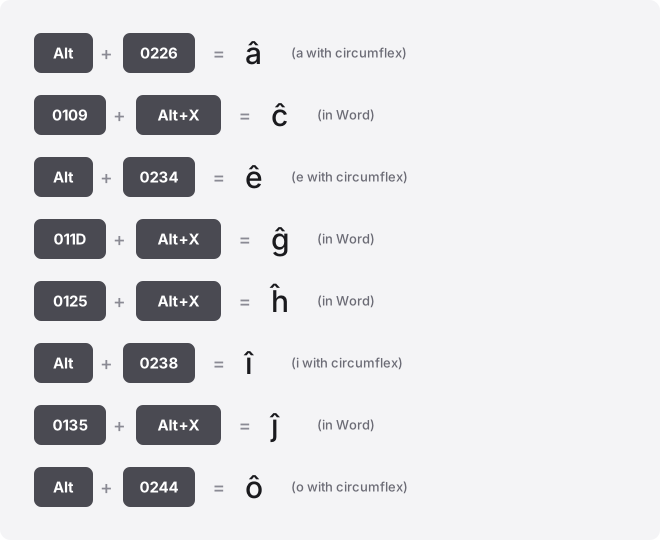
Alt codes are decimal and need a numeric keypad. The Word column is hexadecimal: type the code, then press Alt+X. Seven letter pairs have no Windows Alt code at all, marked below.
| Glyph | Name | Code point | Windows Alt code (decimal) | Word (hex + Alt+X) | HTML |
|---|---|---|---|---|---|
| â | a circumflex, small | U+00E2 | Alt+0226 | 00E2 | â |
| Â | A circumflex, capital | U+00C2 | Alt+0194 | 00C2 | Â |
| ê | e circumflex, small | U+00EA | Alt+0234 | 00EA | ê |
| Ê | E circumflex, capital | U+00CA | Alt+0202 | 00CA | Ê |
| î | i circumflex, small | U+00EE | Alt+0238 | 00EE | î |
| Î | I circumflex, capital | U+00CE | Alt+0206 | 00CE | Î |
| ô | o circumflex, small | U+00F4 | Alt+0244 | 00F4 | ô |
| Ô | O circumflex, capital | U+00D4 | Alt+0212 | 00D4 | Ô |
| û | u circumflex, small | U+00FB | Alt+0251 | 00FB | û |
| Û | U circumflex, capital | U+00DB | Alt+0219 | 00DB | Û |
| ĉ | c circumflex, small | U+0109 | No standard Windows Alt code; Word: 0109 then Alt+X | 0109 | ĉ |
| Ĉ | C circumflex, capital | U+0108 | No standard Windows Alt code; Word: 0108 then Alt+X | 0108 | Ĉ |
| ĝ | g circumflex, small | U+011D | No standard Windows Alt code; Word: 011D then Alt+X | 011D | ĝ |
| Ĝ | G circumflex, capital | U+011C | No standard Windows Alt code; Word: 011C then Alt+X | 011C | Ĝ |
| ĥ | h circumflex, small | U+0125 | No standard Windows Alt code; Word: 0125 then Alt+X | 0125 | ĥ |
| Ĥ | H circumflex, capital | U+0124 | No standard Windows Alt code; Word: 0124 then Alt+X | 0124 | Ĥ |
| ĵ | j circumflex, small | U+0135 | No standard Windows Alt code; Word: 0135 then Alt+X | 0135 | ĵ |
| Ĵ | J circumflex, capital | U+0134 | No standard Windows Alt code; Word: 0134 then Alt+X | 0134 | Ĵ |
| ŝ | s circumflex, small | U+015D | No standard Windows Alt code; Word: 015D then Alt+X | 015D | ŝ |
| Ŝ | S circumflex, capital | U+015C | No standard Windows Alt code; Word: 015C then Alt+X | 015C | Ŝ |
| ŵ | w circumflex, small | U+0175 | No standard Windows Alt code; Word: 0175 then Alt+X | 0175 | ŵ |
| Ŵ | W circumflex, capital | U+0174 | No standard Windows Alt code; Word: 0174 then Alt+X | 0174 | Ŵ |
| ŷ | y circumflex, small | U+0177 | No standard Windows Alt code; Word: 0177 then Alt+X | 0177 | ŷ |
| Ŷ | Y circumflex, capital | U+0176 | No standard Windows Alt code; Word: 0176 then Alt+X | 0176 | Ŷ |
The circumflex mark itself is the same shape on every letter. What differs is whether a given letter has a single precomposed code point (they all do here) and whether Windows assigned it a legacy Alt code (only the ten vowel forms did).
Windows: Alt codes and Character Map
For the vowels, hold the Alt key and type the four-digit code on the numeric keypad, then release Alt. Alt+0226 gives â, Alt+0234 gives ê, and so on down the vowel rows. Use the leading-zero form shown in the table; it reads from the Windows-1252 set and is the same for every reader.
You need a real numeric keypad for this. Laptops without one can borrow the Fn-layer number keys or follow our on-screen accent keyboard to click the letter directly.
The seven consonant letters (ĉ ĝ ĥ ĵ ŝ ŵ ŷ and their capitals) have no Windows Alt code. Open Character Map (search “charmap” in the Start menu), set the font to something wide like Arial or Segoe UI, type the letter name in the search box, then Select and Copy.
The emoji panel at Win+. also has a search field that finds them by name.
Mac: the Option+i dead key
Press Option+i together, release, then type the vowel. Nothing shows until you press the second key, then â ê î ô û appears. This dead-key method covers all five vowels in both cases (hold Shift for the capital).
Option+i does not combine with c, g, h, j, s, w, or y. For those, open the Character Viewer with Ctrl+Cmd+Space, search “circumflex,” and double-click the letter you want. You can drag frequent ones into the Favorites tray so they stay one click away.
Word and PowerPoint
Word has the most reliable route for every letter in the set. Type the hex code from the table, then press Alt+X. Typing 0109 and pressing Alt+X turns it into ĉ; 011D gives ĝ. This works for the consonants that have no Alt code, which is why Word is the easiest place to type Esperanto or Welsh text.
Word’s Alt+X also works in Outlook and OneNote. It does not work in PowerPoint or Excel.
In PowerPoint, use Insert → Symbol, set the subset to Latin Extended-A for the consonants or Latin-1 Supplement for the vowels, and pick the letter. The same Insert → Symbol dialog exists in Word if you prefer clicking.
If you type the same accented word often, add it to AutoCorrect (File → Options → Proofing → AutoCorrect Options) so a plain spelling swaps to the accented one automatically.
Excel and Google Sheets
Neither spreadsheet accepts Word’s Alt+X. In Excel and Google Sheets, build the character from its decimal code point with UNICHAR: =UNICHAR(226) returns â, =UNICHAR(265) returns ĉ. The number is the decimal value of the code point, not the Alt code. Copy the result and paste it as a value if you need plain text.
Excel also has Insert → Symbol. Google Sheets has no symbol menu, so UNICHAR or a paste is the way. If you are pasting into a cell that is already in edit mode, press F2 first so the cell accepts the character instead of overwriting it.
Google Docs
Go to Insert → Special characters. Type “circumflex” in the search box, or draw the accented letter in the sketch pad on the right and Docs matches it.
Click the letter to drop it at the cursor. This finds every letter in the set, vowels and consonants alike, with no Alt code needed.
iPhone and Android
Press and hold the base letter on the on-screen keyboard. A small popup of accented variants appears; slide to the circumflex form and lift your finger. Holding a gives â, holding e gives ê, and so on for the vowels.
The consonant forms are hit or miss on phone keyboards. Some layouts offer ŵ and ŷ under w and y; many do not show ĉ ĝ ĥ ĵ ŝ at all. If the letter you need is missing, copy it from the buttons at the top of this page, or set up a text replacement (iPhone: Settings → General → Keyboard → Text Replacement) so a shortcut like ;cc expands to ĉ.
Chromebook
ChromeOS has no Alt codes. Use Unicode input: hold Ctrl+Shift+U, release, type the hex code from the table, then press Enter or Space.
An underlined u confirms the mode. Type 00e2 for â or 0109 for ĉ, with no U+ prefix.
The symbol picker at Launcher+Shift+Space works too, and newer Chromebooks have a dedicated Quick Insert key. If a web text field swallows the Ctrl+Shift+U shortcut, paste the letter instead.
Notion, Slack, Discord, and Canva
None of these has a built-in accent shortcut. The reliable move is the same in all four: copy the letter from the buttons above and paste it. The characters are plain text, so they keep their accent through a paste with no formatting loss.
For letters you reuse, make it permanent. Slack has Settings → Advanced → text replacement; Notion, Discord, and Canva pick up any system-level text replacement you set in Windows, Mac, or your phone. Map a short trigger to each letter once and stop hunting for it.
HTML and CSS
On the web, the five vowels have friendly named entities: â for â, ê ê, î î, ô ô, û û. Capitals swap the letter case inside the entity. The consonants have no named entity, so use the numeric form from the table, such as ĉ for ĉ.
In CSS content values, escape the hex code point with a backslash: content: "\00E2" for â, content: "\0109" for ĉ. Saving the file as UTF-8 lets you paste the raw letter instead, which is usually cleaner.
Precomposed letters vs combining marks
Every letter in the table is a precomposed character: one code point that already includes the hat. But the same shape can be built a second way, as the plain base letter followed by U+0302, the combining circumflex accent. On screen, a + U+0302 looks identical to â.
The two are not the same to a computer. A precomposed â is one code point; the combining version is two. That difference breaks things quietly: a search for “â” may miss the two-part form, filenames can sort oddly, and form fields sometimes reject or duplicate the accent.
When it matters, normalise the text to NFC (composed form), which most systems apply by default. The copy buttons on this page all give the single precomposed code point, so pasting from here avoids the problem entirely.
Troubleshooting
Alt+0226 does nothing. The number-row keys along the top do not work for Alt codes; you need the separate numeric keypad with Num Lock on. On a keypad-less laptop, use Character Map or the copy buttons instead.
The letter shows as a box (□) or a question mark. The font lacks that glyph.
The vowels are in almost every font, but ĉ ĝ ĥ ĵ ŝ ŵ ŷ are missing from some display and decorative fonts. Switch to Arial, Calibri, Segoe UI, Times New Roman, or Noto Sans and the character reappears.
You got the wrong letter. Check for a missing leading zero.
Alt+0226 is â, but a zero-less Alt+0226 reads from a different code table and produces something else, and the result depends on the reader’s regional OEM code page. Always use the leading-zero form from the table.
Autocorrect keeps flattening the accent. A spell checker set to English may “correct” â to a. Add the word to your dictionary, or set the paragraph language to French, Esperanto, or Welsh so the checker leaves it alone.
Where these letters are used
The vowels â ê î ô û are core French spelling, as in gâteau, être, hôpital, and coût. They also appear in Portuguese (â ê ô), Welsh (â ê î ô û ŵ ŷ), and several other languages.
The consonant set ĉ ĝ ĥ ĵ ŝ is almost entirely Esperanto, where the hat marks a distinct sound. Getting them right matters most when you are writing or quoting text in those languages, or setting a name that carries the accent.
Related accent guides
People mix the circumflex up with its neighbours. Compare it with the grave accent letters (à è ì ò ù) that lean left and the acute accent letters (á é í ó ú) that lean right. The circumflex is the two-stroke hat that combines both directions.
For marks that sit differently, see letters with a tilde (ã ñ õ), letters with a cedilla (ç), and letters with a caron or háček (č š ž), whose wedge is easy to confuse with the circumflex at small sizes.
For everything in this group, start with the complete guide to typing accented letters or browse the full accented letters collection.
Frequently asked questions
Why do only the vowels have Windows Alt codes?
The vowel forms sit in the older Windows-1252 and Latin-1 character sets, which Windows mapped to Alt codes years ago. The consonant forms live in Latin Extended-A, a later block that never got Alt codes. Use Word’s Alt+X, Character Map, or the copy buttons for those.
What is the difference between â and a + combining circumflex?
They look the same but are stored differently. â is a single code point; the combining version is the letter a plus a separate accent code point. Search, sorting, and some form fields treat them as different text, which is why the copy buttons here give the single precomposed form.
How do I type Ŵ and Ŷ for Welsh?
They have no Alt code. In Word, type 0174 then Alt+X for Ŵ, or 0176 then Alt+X for Ŷ.
On Chromebook, use Ctrl+Shift+U then the same hex code. Installing the Welsh keyboard layout adds a dead key that makes them faster if you type Welsh often.
Why does the accent disappear when I upload a filename or fill a form?
Some systems strip or reject non-ASCII characters, and others normalise the text and change how the accent is stored. If a form keeps mangling â, paste the precomposed version rather than typing a combining sequence, or spell it without the accent where the system allows.
Can I type these on a phone without long-pressing every time?
Yes. Set up a text replacement so a short trigger expands to the letter or a whole word.
On iPhone it is Settings → General → Keyboard → Text Replacement; on Android it is under Personal dictionary in the keyboard settings. This is the only practical way to type ĉ ĝ ĥ ĵ ŝ on a phone.
What is the circumflex accent called in other names?
People call it the “hat,” the “caret” (though a bare ^ on its own line is technically a different character, U+005E), or the “roof.” In French it is accent circonflexe. In Esperanto the accented consonants are sometimes called “chapelo” letters, from the word for hat.