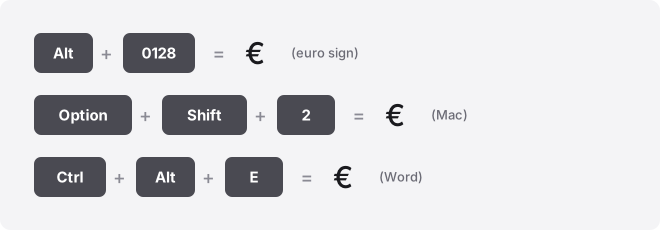
The fastest way to type the euro symbol (€) is to copy it from the button below, or on Windows hold Alt and type 0128 on the numeric keypad. On a Mac, press Option + Shift + 2. The € character is the euro sign, Unicode U+20AC, used for the currency of the eurozone.
Copy it once and it works anywhere you can paste: a document, a spreadsheet cell, a chat message, or a website bio. If you type prices often, learning one keyboard shortcut is worth the ten seconds it takes.
Euro symbol codes at a glance
| Method | Code / shortcut |
|---|---|
| Glyph | € |
| Unicode name | EURO SIGN |
| Unicode code point (hex) | U+20AC |
| Windows Alt code (decimal) | Alt+0128 |
| Windows Alt code, Unicode-aware apps (decimal) | Alt+0128 |
| Mac shortcut | Option + Shift + 2 |
| Word shortcut | Ctrl + Alt + E |
| Word Alt+X (hex) | Type 20AC, then press Alt+X |
| Chromebook / Linux (hex) | Ctrl+Shift+U, then 20ac |
| Excel / Sheets formula | =UNICHAR(8364) |
| HTML named entity | € |
| HTML numeric (decimal) | € |
| HTML numeric (hex) | € |
| CSS escape | \20AC |
Two number columns appear above and they mean different things. The Alt code takes a decimal number (0128 or 8364).
The Word Alt+X method and the Chromebook shortcut take the hexadecimal code (20AC). Do not feed the hex value into an Alt code — it produces the wrong character or nothing.
How to type the euro symbol on any device
Windows
Hold Alt and type 0128 on the numeric keypad, then release Alt. The leading zero matters: it selects the Windows-1252 character set where the euro sign lives. In Unicode-aware apps you can also use Alt+0128, but 0128 is the reliable default.
No numeric keypad? The Alt method needs the separate keypad, not the top-row numbers. Instead press Win + .
(period) to open the emoji and symbol panel, search “euro,” and click it. Character Map (search “charmap” in the Start menu) is the other built-in fallback.
Mac
Press Option + Shift + 2 and the € appears at the cursor. Macs have no Alt codes, so this key combination is the fast route. If you forget it, open the Character Viewer with Control + Command + Space, search “euro,” and double-click.
On some non-US keyboard layouts the euro sits on a different key, so check Option + 2 as well if Shift+Option+2 gives you something else.
Microsoft Word, Excel and PowerPoint
Word has its own shortcut: Ctrl + Alt + E. You can also type 20AC and press Alt+X to convert the hex code into €. Both work in Word, Outlook and OneNote, but not in Excel or PowerPoint.
In Excel, the formula =UNICHAR(8364) returns € in a cell. You can also use the standard Windows Alt+0128 while a cell is in edit mode, or paste the copied glyph. In PowerPoint, use Insert → Symbol and pick the euro sign, or paste it in.
Google Docs and Google Sheets
In Google Docs, open Insert → Special characters, then type “euro” in the search box or draw the shape to find it. Click the € to drop it in.
Google Sheets has no special-characters menu. Use the formula =UNICHAR(8364) in a cell, or paste the symbol you copied above. If you are typing an OS-level shortcut into a cell, press F2 first to enter edit mode.
iPhone and Android
On both phones, open the number keyboard by tapping the 123 key, then the #+= or symbols key. The € appears among the currency symbols. On many keyboards you can also long-press the $ key to reveal €, £, ¥ and others, then slide to pick it.
Chromebook
Chromebooks have no Alt codes. Press Ctrl + Shift + U, type 20ac (the hex code, no U+ prefix), then press Enter or Space.
An underlined u confirms you are in Unicode input mode. If a web text field swallows the shortcut, paste the copied glyph instead.
Notion, Slack, Discord and Canva
None of these apps needs a special trick. Paste the € you copied above and it renders correctly in messages, page titles, and design text. In Slack, you can type :euro: only if a matching custom emoji exists; the safe route is paste.
If you use the euro sign constantly, set up a text replacement so a short trigger expands to €. On Mac it is System Settings → Keyboard → Text Replacements; on iPhone and Android it is under keyboard settings. That makes it available in every app without a shortcut.
On the web: HTML and CSS
For a web page, use the named entity € for readability, or the numeric forms € (decimal) and € (hex). In CSS content values, write the escape \20AC. All four output the same €.
Where the euro symbol gets used
The euro sign marks prices and totals across the eurozone: invoices, receipts, spreadsheets, price lists, and online checkouts. Placement varies by country, so you will see both €10 and 10 € in the wild.
It also shows up in bios, product titles, and chat when someone quotes a figure in euros. Because € is plain text, not an emoji, it looks the same on a phone and a laptop — no colour version, no rendering surprises.
What the euro symbol is confused with
The main lookalike is ₠, the euro-currency sign (U+20A0). It was proposed before the real euro sign was finalised and is now obsolete. If a page shows ₠ where it means euros, that is the wrong character — the correct one is €.
People also mix up the euro with other currency marks like £ and ¥ when typing on an unfamiliar keyboard, since these often share the same long-press menu.
Troubleshooting
- Alt+0128 does nothing: you are using the top-row numbers or a laptop without a keypad. Use the numeric keypad, turn on Num Lock, or switch to Win + . for the emoji panel.
- You get Ç or a different character: you likely typed 128 without the leading zero, which reads from a different code page. Always include the zero: 0128.
- € shows as a box or ?: the current font lacks the glyph. Switch to a common font like Arial, Calibri, or Segoe UI, all of which include the euro sign.
- The Chromebook shortcut fails in a web field: the site is intercepting the keystroke. Paste the copied glyph instead.
Related guides
Working across currencies? See our world currency symbols list for every sign in one place, or browse the full currency symbols category. To grab any character without memorising a code, use the copy-and-paste symbol tool.
- Dollar symbol ($): how to type it on any keyboard
- Pound symbol (£): copy, paste and type guide
- Japanese yen symbol (¥): how to type it
- How to type the Indian rupee symbol (₹) fast
- Korean won symbol (₩): copy, paste and type guide
Frequently asked questions
What is the Alt code for the euro symbol?
On Windows, hold Alt and type 0128 on the numeric keypad. The leading zero matters, it selects the Windows-1252 character set. In Unicode-aware apps, Alt+0128 also works.
How do I type the euro sign on a Mac?
Press Option + Shift + 2. Macs have no Alt codes, so this is the fast method.
You can also open the Character Viewer with Control + Command + Space and search “euro. “
Why does Alt+128 give me a different character?
Without the leading zero, the code reads from the old DOS code page instead of Windows-1252, which produces Ç rather than €. Always type 0128 with the zero to get the euro sign reliably.
Why does the euro symbol show as a box?
The font you are using does not include the euro glyph. Switch to a standard font such as Arial, Calibri, or Segoe UI, all of which contain €. The character itself is fine; only the display font is missing it.
Can I use the euro symbol in a username or bio?
Yes on most platforms. The euro sign is a standard text character, so it works in bios, display names, and messages wherever Unicode is allowed. Paste the copied glyph if the platform has no symbol menu.
How do I put the euro symbol in Excel?
Use the formula =UNICHAR(8364) in any cell, type Alt+0128 while the cell is in edit mode, or paste the copied €. The same UNICHAR formula works in Google Sheets, which has no symbol menu.