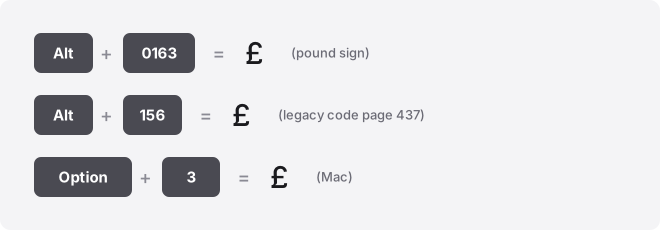
The pound symbol (£) is the sign for the British pound sterling, GBP. Copy it straight from the button below, or type it on Windows with Alt+0163 on the numeric keypad, on a Mac with Option+3, and in Word by typing 00A3 then pressing Alt+X. Its Unicode name is POUND SIGN, code point U+00A3.
The £ character marks prices, invoices, and salaries in the United Kingdom. It is unrelated to the # sign, which Americans also call the “pound sign” out of habit. More on that confusion below.
Pound symbol codes at a glance
| Attribute | Value |
|---|---|
| Glyph | £ |
| Unicode name | POUND SIGN |
| Code point | U+00A3 |
| Unicode (hex) | 00A3 |
| Windows Alt code (decimal) | Alt+0163 |
| Mac shortcut | Option + 3 |
| Word Alt+X (hex) | 00A3 then Alt+X |
| Chromebook / Linux (hex) | Ctrl+Shift+U then 00a3 |
| Excel / Sheets formula | =UNICHAR(163) |
| HTML named entity | £ |
| HTML numeric (decimal) | £ |
| HTML numeric (hex) | £ |
| CSS escape | \00A3 |
Read the two number columns carefully. The Alt code is a decimal value, so it takes 0163.
The Word Alt+X method takes the hex value 00A3. They are the same character with two different numbers, and swapping them gives you the wrong result.
How to type the pound symbol on any device
Windows
Hold Alt and type 0163 on the numeric keypad, then release. This is the reliable form. If your laptop has no separate number pad, use the on-screen options below or see our guide to typing symbols without a numeric keypad.
A shorter code, Alt+0163 without the leading zero, also produces £ but only in Unicode-aware apps. On the older CP437 code page the zero-less code that maps to £ is 156, and which table your machine reads depends on your regional settings. Skip the guesswork and use Alt+0163.
No keypad and no memory for codes? Press Win+.
(the period key) to open the emoji and symbol panel, switch to the symbols tab, and pick £. Or open Character Map, search “pound sign,” and copy it.
Many UK keyboards also have £ printed on the 3 key. Press Shift+3 when your keyboard layout is set to United Kingdom. On a US layout, Shift+3 gives # instead.
Mac
Press Option + 3 on a US layout. On a British layout, £ is unshifted or on Shift+3, depending on the keyboard. There are no Alt codes on macOS, so ignore any 0163 instructions here.
To browse instead, open the Character Viewer with Ctrl+Cmd+Space, search “pound,” and double-click the glyph.
Word, and Outlook and OneNote
Type 00A3, then press Alt+X. Word converts the hex code into £.
This works in Outlook and OneNote too. It does not work in Excel, PowerPoint, or Google Docs, so do not carry it into those apps.
You can also use Insert → Symbol → More Symbols and search for the pound sign. Windows Alt+0163 works in Word as well.
Excel and Google Sheets
Use the formula =UNICHAR(163) in either program to output £. In Excel you can also use Insert → Symbol, or apply the currency number format if you want figures displayed as £1,250 without typing the sign into each cell.
Google Sheets has no Insert Symbol menu. Use the formula, paste the glyph, or type it elsewhere and copy it in. To use an OS shortcut inside a cell, press F2 first to enter edit mode.
PowerPoint and Google Docs
In PowerPoint, use Insert → Symbol and pick £, or paste from the button above. Windows Alt+0163 works in a text box too.
In Google Docs, go to Insert → Special characters, then type “pound” in the search box or draw the shape to find it.
iPhone and Android
On both phones, open the numbers layer of the keyboard by tapping 123, then #+= if needed. On iPhone, touch and hold the $ key and a small menu pops up with £, €, ¥, and more; slide to £. Android’s currency key behaves the same way.
If you type £ often, set up a text replacement so a short trigger expands to it. iPhone: Settings → General → Keyboard → Text Replacement. Android: Settings → System → Languages → Personal dictionary.
Chromebook
ChromeOS has no Alt codes. Press Ctrl+Shift+U, type 00a3, then press Enter or Space. An underlined u confirms you are in Unicode input mode.
Type the hex only, with no U+ prefix. You can also open the symbol picker with Launcher+Shift+Space.
Notion, Slack, Discord, and Canva
None of these have a dedicated pound-sign shortcut. Paste it from the copy button, or type it with your operating system’s method and it carries over.
In Slack and Discord you can save a custom text shortcut so a trigger word expands to £. In Canva, paste it into any text box and it takes on your chosen font.
Where people use the pound sign
The £ prefixes prices, so it sits before the amount: £4.99, £1,250. It appears on invoices, payslips, receipts, product listings, and rent agreements across the UK.
Online you will see it in shop checkouts, spreadsheets tracking budgets, and social bios of UK sellers. Sterling amounts in accounting software and email quotes lean on it constantly. For non-sterling amounts you may want the euro symbol (€) or the dollar sign ($) instead.
What the pound sign is confused with
The biggest mix-up is with #. In North America the # key is called the “pound sign,” which has nothing to do with currency.
The sterling character is £ (U+00A3); the number/hash sign is # (U+0023). Different keys, different codes.
People also confuse £ with the lira sign ₤ (U+20A4), an older double-barred glyph, and with the pound weight abbreviation “lb.” When a font lacks £, some systems fall back to these lookalikes.
Troubleshooting the pound sign
- Alt+0163 does nothing: use the numeric keypad, not the top-row numbers, and make sure Num Lock is on. On a laptop without a keypad, use Win+. or paste.
- You get # instead of £: your keyboard layout is set to US English. Shift+3 gives # on a US layout and £ on a UK layout. Switch layouts or use Alt+0163.
- £ shows as a box or question mark: the font lacks the glyph, which is rare for £. Switch to a common font like Arial, Calibri, or Times New Roman.
- Wrong currency symbol appears: in Excel, check that the cell format is set to Pound Sterling and not another locale’s currency.
Related guides
Working across several currencies? Start with the world currency symbols list for every sign in one place, or browse the full currency symbols collection. To grab any glyph fast, use the copy and paste symbols tool.
- Japanese Yen Symbol (¥): How to Type It on Keyboard
- How to Type the Indian Rupee Symbol (₹) Fast
- Korean Won Symbol (₩) — Copy, Paste & Type Guide
Frequently asked questions
What is the Alt code for the pound symbol?
Hold Alt and type 0163 on the numeric keypad to get £. The zero-less Alt+0163 also works in Unicode-aware apps, but Alt+0163 is the reliable form across settings.
Why does my keyboard type # instead of £?
Your keyboard layout is set to US English, where Shift+3 produces #. Switch to the United Kingdom layout so Shift+3 gives £, or use Alt+0163 on any layout.
Is the pound sign the same as the hashtag?
No. The currency symbol is £ (U+00A3). The hash or number sign is # (U+0023). Americans call # the “pound sign” as a nickname, but it is not the sterling character.
How do I type £ on a Mac?
Press Option+3 on a US layout. On a British layout £ is usually on the 3 key directly. Macs have no Alt codes, so 0163 will not work there.
How do I get the pound symbol in Google Sheets?
Enter =UNICHAR(163) in a cell, or paste the glyph. Sheets has no Insert Symbol menu, so the formula or a paste is the way in.
Does the pound symbol work in a username or bio?
Yes. £ is a standard Unicode character that pastes into most bios, display names, and chat messages. Some platforms restrict usernames to letters and numbers, so check the field’s rules before relying on it.