Umlaut letters are ä ë ï ö ü ÿ and their capitals Ä Ë Ï Ö Ü Ÿ. On Windows, hold Alt and type a four-digit code on the numeric keypad—Alt+0228 gives ä, Alt+0252 gives ü.
On Mac, press Option+u, release both keys, then type the vowel. Both work in Word, Excel, and most apps.
The two dots on top are technically a diaeresis. In German the same mark is called an umlaut, and in everyday English most people call all of these umlaut letters regardless of language. This guide gives you the code for every one of the 12 characters and a method for every platform you are likely to be typing in.
Umlaut letter codes: the full reference table
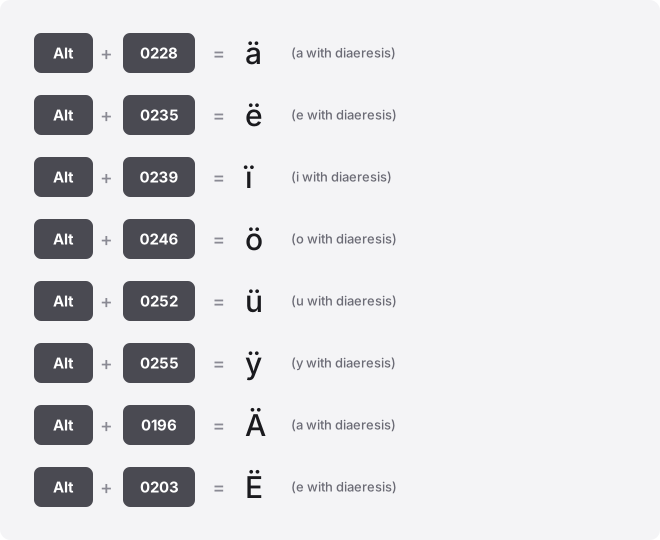
Every character below is a single precomposed Unicode code point, so it copies, saves, and searches as one letter. Windows Alt codes here all use the leading-zero form, which reads from the Windows-1252 table and gives the same result on every regional keyboard.
| Glyph | Unicode name | Code point (hex) | Alt code (decimal) | Word: type then Alt+X | HTML |
|---|---|---|---|---|---|
| ä | U+00E4 | U+00E4 | Alt+0228 | 00E4 | ä |
| ë | U+00EB | U+00EB | Alt+0235 | 00EB | ë |
| ï | U+00EF | U+00EF | Alt+0239 | 00EF | ï |
| ö | U+00F6 | U+00F6 | Alt+0246 | 00F6 | ö |
| ü | U+00FC | U+00FC | Alt+0252 | 00FC | ü |
| ÿ | U+00FF | U+00FF | Alt+0255 | 00FF | ÿ |
| Ä | U+00C4 | U+00C4 | Alt+0196 | 00C4 | Ä |
| Ë | U+00CB | U+00CB | Alt+0203 | 00CB | Ë |
| Ï | U+00CF | U+00CF | Alt+0207 | 00CF | Ï |
| Ö | U+00D6 | U+00D6 | Alt+0214 | 00D6 | Ö |
| Ü | U+00DC | U+00DC | Alt+0220 | 00DC | Ü |
| Ÿ | U+0178 | U+0178 | Alt+0159 | 0178 | Ÿ |
Two things to note in that table. The lowercase forms sit in the U+00E4–U+00FF range, so their Alt codes and code points look related; the uppercase forms sit lower.
And the capital Ÿ is the odd one out: it lives at U+0178, far from its lowercase ÿ, because it was added to Unicode much later. Its Alt code is Alt+0159, not a number near 0255.
Windows: Alt codes and the emoji panel
The Alt code method needs a physical numeric keypad. Turn on Num Lock, hold Alt, type the four digits on the keypad (not the top row), then release Alt. Alt+0246 gives ö, Alt+0214 gives Ö.
On a laptop without a keypad, the codes will not fire. Use the emoji and symbol panel instead: press Win + .
(period), click the Ω symbols tab, open Latin, and pick the letter. For a full character list, search the Start menu for Character Map, find the glyph, and copy it.
Mac: the Option+u dead key
Mac has no Alt codes. Use the umlaut dead key: press Option + u together, release, then type the vowel. Option+u then a gives ä; Option+u then Shift+O gives Ö.
This works for a, e, i, o, u, and y across almost every Mac app. For anything else, open the Character Viewer with Control + Command + Space, search “diaeresis,” and double-click to insert.
Word, Outlook, and OneNote: Alt+X and Insert Symbol
In Word you can type the hex code and convert it in place. Type 00FC and press Alt+X, it flips to ü.
Type 0178 then Alt+X for Ÿ. If it grabs extra characters before the code, select just the four digits first, then press Alt+X.
Prefer a menu? Go to Insert → Symbol → More Symbols, set the subset to Latin-1 Supplement, and pick the letter.
The same Alt+X trick works in Outlook and OneNote. It does not work in Excel, PowerPoint, or Google Docs.
Excel and PowerPoint
In Excel there is no Alt+X. Use the UNICHAR function with the decimal code point: =UNICHAR(228) returns ä, =UNICHAR(376) returns Ÿ. Copy the result and paste as a value if you want plain text. Windows Alt codes also work directly inside a cell if you have a keypad.
In PowerPoint, use Insert → Symbol and choose Latin-1 Supplement, the same route as Word’s dialog. Alt codes work in a text box on Windows too.
Google Docs and Google Sheets
In Google Docs, open Insert → Special characters, type “diaeresis” or the letter name in the search box, or draw the shape in the sketch pad, then click the result. There is no Alt+X.
Google Sheets has no special-characters menu. Use UNICHAR with the decimal value: =UNICHAR(246) gives ö.
Press F2 first if you want to enter cell edit mode before pasting a copied character. The simplest route in Sheets is often to copy the glyph from the widget at the top of this page and paste it in.
iPhone and Android
On both phones, press and hold the base vowel on the on-screen keyboard. Hold u and a small row of accented options appears; slide to ü and release. The same works for a, o, e, i, and y.
For capitals, tap Shift first, then hold the letter. If a vowel does not show the umlaut option, add a German or European keyboard in Settings, which expands the pop-up choices.
Chromebook
ChromeOS has no Alt codes. Use the Unicode input shortcut: hold Ctrl + Shift + U, release, type the hex code, then press Enter or Space. For ä type e4; for ü type fc; for Ÿ type 178.
Type the hex only, no “U+” prefix. An underlined u appears while you type to confirm the mode.
Some web forms swallow this shortcut. If nothing appears, open the picker with Launcher + Shift + Space (or the Quick Insert key on newer models), or paste the character from the copy buttons above.
Notion, Slack, Discord, and Canva
None of these apps have a dedicated umlaut shortcut. The reliable move is to copy the letter from the widget at the top and paste it, these are plain text characters and paste cleanly everywhere.
If you type a word like über or Motörhead often, set a text replacement so you never chase the code again. On Mac use System Settings → Keyboard → Text Replacements; on Windows and phones use your keyboard’s shortcut or autocorrect list.
Type a trigger like uue and let it expand to ü. In Canva specifically, click into a text box and paste, since its font picker has no symbol menu.
HTML and CSS for the web
In HTML, named entities are the most readable: ä (ä), ö (ö), ü (ü). Numeric forms work too, ö decimal or ö hex both give ö. The capital Ÿ has no short named entity in common use, so write Ÿ or Ÿ.
In CSS content values, escape with a backslash and the hex code: content: "\F6" for ö. If your page and file are saved as UTF-8, you can also paste the raw letter directly into the markup with no entity at all.
Precomposed letters versus combining marks
Every umlaut letter here is precomposed: one code point holds both the letter and the dots. But the identical-looking result can also be built from two code points—the plain letter plus a combining diaeresis (U+0308). So “ü” might be one character or two, and your eyes cannot tell them apart.
This matters when the bytes are compared rather than the picture. A precomposed ü and a decomposed u+◌̈ can fail to match in a website search box, sort into different positions, break a filename lookup, or count as a different length in a form field. If a name refuses to match a database, mismatched forms are a likely cause.
The fix is Unicode normalization. Converting text to NFC form collapses the two-code-point version back into the single precomposed character.
Most modern systems do this automatically, but pasted text from older sources sometimes carries the decomposed version. The buttons at the top of this page all output the precomposed single-character form.
Troubleshooting
The letter shows as □ or ?. The font lacks the glyph.
Almost all standard fonts cover ä ö ü, but decorative and icon fonts sometimes drop the accented Latin set, especially the capital Ÿ. Switch to a broad font like Arial, Calibri, or Noto Sans.
Alt+0159 gives nothing for Ÿ. That code lives in the Windows-1252 upper range and needs the leading zero and a real numeric keypad. On a keypad-less laptop, use Word’s 0178 then Alt+X, or paste it.
You got the wrong character. Dropping the leading zero changes the table.
Alt+0228 (no zero) reads from an OEM code page and does not give ä, always type the four-digit Alt+0228 form. Also check you did not confuse ü with ù (grave) or û (circumflex), which look similar at small sizes.
The dead key does nothing on Mac. Option+u only starts the accent; you must release and then press the vowel. Holding both together, or typing a consonant afterward, cancels it and inserts a bare ¨.
Where these letters are used
ä, ö, and ü appear across German, Finnish, Swedish, Estonian, and Hungarian, and in names like Müller and Björk. ë and ï show up in French, Dutch, and English words like naïve and Zoë, where the diaeresis marks a separately pronounced vowel. ÿ and Ÿ are rare, turning up in a few French place names and surnames such as L’Haÿ-les-Roses.
Related symbols
- Acute accent (á é í ó ú), a single stroke rising to the right, not two dots. See how to type acute accent letters.
- Grave accent (à è ì ò ù), a single stroke falling to the right; often confused with an umlaut at small sizes. See the grave accent typing guide.
- Circumflex (â ê î ô û) — a small hat over the vowel. See how to type circumflex letters.
- Tilde (ã ñ õ), a wavy line, common in Spanish and Portuguese. See the tilde letters guide.
- Cedilla (ç), a hook hanging below the c. See how to type a cedilla.
Related guides and tools
Type any accented character straight from your browser with the on-screen accent keyboard. For the full family of marks and every method in one place, read the complete guide to typing accented letters, or browse more accented-letter guides.
Frequently asked questions
Is an umlaut the same as a diaeresis?
They are the same two-dot mark and the same Unicode character. “Umlaut” is the German name, where the mark signals a changed vowel sound; “diaeresis” is used in French, Dutch, and English, where it marks a vowel pronounced separately. On a keyboard there is no difference, both use the codes in the table above.
Why does the capital Ÿ have such a different code from ÿ?
Lowercase ÿ has been in the basic Latin-1 set since early Unicode at U+00FF. The uppercase Ÿ was added later at U+0178 because it is so rare, so it sits in a different block. That is why its Alt code is 0159 rather than a number close to ÿ’s 0255.
My umlaut name matches on screen but fails in a login form. Why?
The two versions probably differ under the surface, one is a precomposed single character and one is a base letter plus a combining diaeresis. They look identical but compare as different byte sequences. Retype the field using the precomposed letter, or paste from the widget above, which outputs the single-character form.
Can I type umlauts without a numeric keypad on Windows?
Yes. Alt codes need the keypad, but the emoji panel does not, press Win + period, open the symbols tab, and pick the letter. In Word you can also type the hex code and press Alt+X. Copying from this page works in any app.
How do I get umlauts faster if I type them all day?
Switch to a keyboard layout that has them, or set text replacements. On Windows and Linux the US-International layout turns " then a vowel into ä ö ü.
On Mac the Option+u dead key already does this. For occasional words, a text-replacement rule that expands a trigger into the full word is quickest.
Do umlaut letters work in email addresses and URLs?
Modern internationalized domains and some mail systems accept them, but many older systems convert ü to “ue” or strip the accent. For addresses and file paths where compatibility matters, the safe fallback in German is to expand ä ö ü to ae oe ue.